

Fanpit
- A Multi-Service Lifestyle App

Overview
Fanpit is a multi-service mobile platform that brings together food delivery, event ticketing, service bookings, movie tickets, and retail deals into a single seamless experience.
The goal was to design a scalable interface that balances multiple services while maintaining clarity, usability, and strong user retention through loyalty and AI-driven interactions.
Problem
Designing a multi-service app introduces complexity at multiple levels:
-
Users can feel overwhelmed with too many service options
-
Food ordering must remain as deep and intuitive as dedicated apps
-
Restaurant discovery often leads to decision fatigue
-
Loyalty systems can become confusing
-
AI integrations risk being intrusive if not handled carefully
Approach
To solve this, I focused on:
-
Progressive disclosure to avoid overwhelming users
-
Service-specific flows to maintain depth
-
Smart defaults & personalization to reduce decision-making effort
-
Subtle AI integration for assistance without disruption
-
Simple, transparent loyalty system to drive retention
User Flow
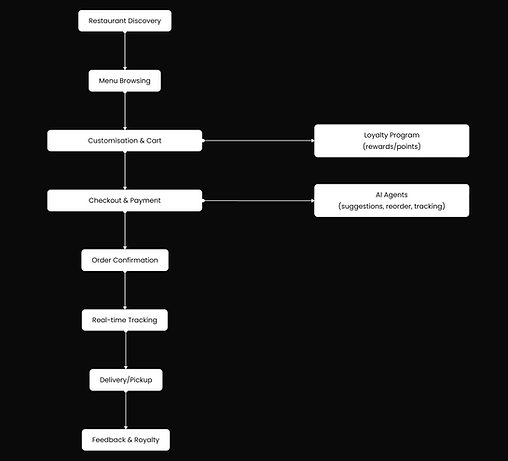
The experience starts from onboarding and branches into multiple services, with a detailed focus on the food ordering journey, from discovery to feedback; all while integrating loyalty and AI touchpoints throughout.

Landing Page (Multi-Service Hub)
-
Home / Dashboard
-
Service Options:
-
Food Ordering
-
Event Ticketing
-
Service Booking
-
Movie Tickets
-
Retail Deals
-
Loyalty Program
-
-
-
Navigation Options:
-
Search, Orders, Rewards, Profile
-

Landing Experience (Multi-Service Hub)
Goal: Present multiple services without cognitive overload
-
Clean grid-based service layout
-
Personalized banners (offers, recommendations)
-
Quick access to high-intent actions (e.g., “Order Food”)
-
Visible loyalty status to encourage engagement
Food Ordering Journey
1. Restaurant Discovery
-
Smart defaults: “Popular near you”, “Based on your history”
-
Filters for quick narrowing (cuisine, rating, delivery time)
-
Visual hierarchy to highlight top options


2. Menu Exploration
-
Categorized menu structure
-
Clear item cards with quick add-to-cart
-
Focus on readability and speed
3. Cart & Customization
-
Easy item modification (addons, quantity)
-
Clear pricing breakdown
-
Loyalty rewards & coupons integrated

4. Checkout & Payment
-
Minimal, consistent checkout flow
-
Multiple payment options (UPI, cards, wallet)
-
Seamless experience across all services
5. Order Tracking & Completion
-
Real-time status updates
-
Delivery partner visibility
-
Smooth transition to feedback
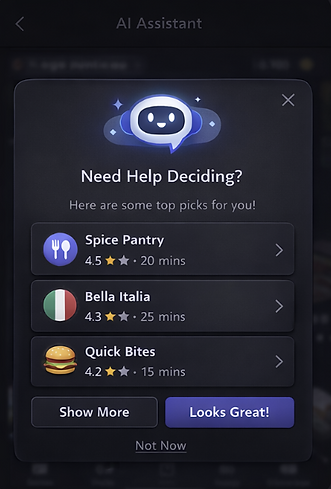
AI Assistant Integration
Goal: Assist without interrupting
-
Context-aware suggestions (e.g., when user hesitates)
-
Quick reorder and smart recommendations
-
Lightweight, dismissible interface
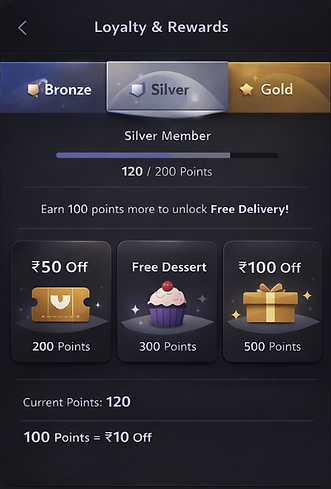
Loyalty & Retention
Goal: Encourage repeat usage without complexity
-
Simple point system (easy to understand & redeem)
-
Tier-based progression with visible benefits
-
Instant reward feedback after actions
Key Design Decisions
-
Balanced depth vs simplicity using modular flows
-
Reduced decision fatigue with smart defaults and filters
-
Designed AI as a support system, not a disruption
-
Simplified loyalty into a clear and rewarding system
-
Maintained consistent UX patterns across services
Outcome & Learnings
This project helped me explore how to design complex ecosystems without overwhelming users.
I learned how to:
-
Structure multi-service platforms with clarity
-
Design for both user experience and business goals (retention, conversion)
-
Use AI and personalization meaningfully
-
Maintain consistency across diverse user journeys